
ADVERTISEMENT
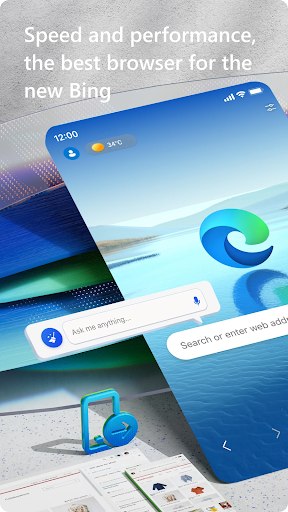
Discover the transformational experience of web navigation with the free Microsoft Edge: Browse with AI app, an innovative browser designed to redefine your online journey. Empowered with AI using GPT-4 and the visual creativity of DALL-E 3, Microsoft Edge stands out as a smart assistant for all your browsing needs. Available for both Android and IOS, you can effortlessly install the Microsoft Edge: Browse with AI app and embark on a seamless browsing adventure. Download Microsoft Edge: Browse with AI from your preferred app store and login to enjoy a plethora of cutting-edge features.
1. Enhanced Searches: The Copilot feature, powered by GPT-4 technology, delivers ultra-precise search results, in-depth page summaries, and swiftly summarizes web content and PDFs.
2. Creativity and Efficiency: Utilize Copilot for transforming thoughts into well-crafted words or indulge in art-making with the DALL-E 3 integration, which translates text prompts into stunning images.
3. Multitasking and Accessibility: Read Aloud functionality offers you the luxury to listen to content in multiple accents and languages, enriching your reading comprehension and multitasking capabilities.
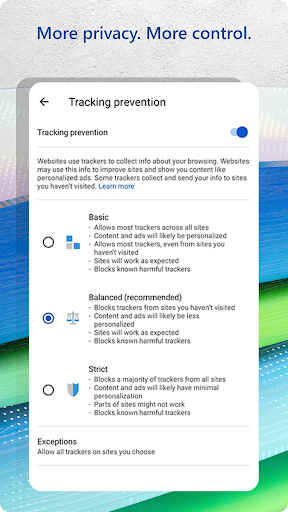
4. Incomparable Safety Features: InPrivate browsing coupled with advanced tracking prevention and Microsoft Defender Smartscreen ensures your digital footprint is secure and your privacy is intact.
5. Smart Shopping: Integrated tools like price comparison, coupons, and Microsoft Rewards* embellish your shopping experience, ensuring you not only save money but also earn rewards on purchases.
1. Privacy and Security: The Microsoft Edge: Browse with AI app prioritizes privacy with features like InPrivate search, tracking prevention, and dark web password alerts.
2. Intelligent Assistance: Copilot, backed by the GPT-4 model, offers extraordinary help in searches, summarization, and content creation.
3. Shopping Made Smarter: Edge’s built-in shopping tools aim to maximize savings while shopping online, complemented by Microsoft Rewards*.
1. Learning Curve: The numerous features and AI-powered tools may require some acclimation for new users.
2. Resource Intensity: Microsoft Edge: Browse with AI may be more resource-intensive than simpler browser apps, which could impact performance on older devices.
3. Availability: Certain features like Microsoft Rewards* and integrated shopping tools may have limited availability depending on the region.
1. Customize Privacy Settings: After installation, adjust the privacy and security settings to suit your preferences for a comfortable and secure browsing session.
2. Explore Copilot Commands: Familiarize yourself with Copilot commands to fully utilize the app's potential in helping with searches, drafts, and image creations.
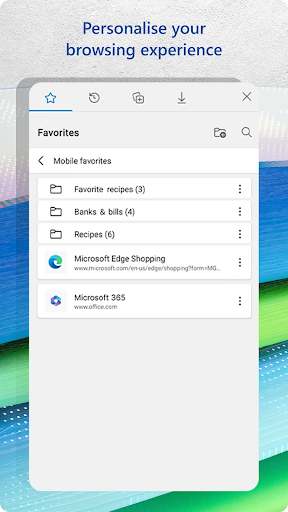
3. Sync Across Devices: Ensure you sync your favorites, passwords, and other data across all devices where you have Microsoft Edge installed for a cohesive experience.
4. Enable AdBlock: Activate AdBlock Plus within the Edge app to filter unwanted ads and distractions, enhancing your overall browsing focus.
Q: Is it free to download and install Microsoft Edge: Browse with AI?
A: Yes, the app is free to download and install across various platforms, including Android and IOS.
Q: How does Microsoft Edge: Browse with AI protect my privacy?
A: It uses features like InPrivate browsing, tracking prevention, Microsoft Defender Smartscreen, and password monitoring to enhance user privacy.
Q: Can I earn rewards by using Microsoft Edge: Browse with AI?
A: Yes, by utilizing the Microsoft Rewards* program within the app, you can earn rewards on eligible purchases.
[*Terms and conditions may apply for the Microsoft Rewards program; availability may vary by region.]
ADVERTISEMENT



Welcome to AppsAnny - your go-to destination for downloading the latest and most popular Android apps. Our mission is to provide a safe, reliable, and user-friendly platform for Android users to discover and download the best apps.
At AppsAnny, our top priority is to deliver top-notch content that is relevant to our users. Our team of experts carefully selects and reviews each app before it is available for download on our platform. We also regularly update our app library to ensure our users can access the latest versions of their favorite apps.
At AppsAnny, we provide a wide range of high-quality apps that cater to all your needs. Our platform is continuously updated with the latest and hot apps, ensuring users can access the most up-to-date apps.
We prioritize providing a seamless and hassle-free app download experience. Our website is easy to navigate, and our download process is quick and secure.
Thank you for choosing AppsAnny as your trusted source for Android apps. We hope you enjoy using our platform and welcome your feedback and suggestions.


