
ADVERTISEMENT
Embark on an enhanced driving journey with Android Auto, your premier smart driving companion. Designed to harmonize with your need to remain focused, connected, and entertained, Android Auto app infuses your road experience with the brilliance of the Google Assistant. Boasting a sleek interface adorned with large buttons, alongside commanding voice actions, Android Auto apk transforms your in-car tech utilizations. Enjoy the free Android Auto app’s capabilities, from navigation to communication, without compromising safety. Simply download Android Auto, install it with ease, and engage in a seamless Android Auto installation process to step into the future of driving.
1. Voice-Driven Navigation: Conjure guidance to your destination with real-time GPS via Google Maps or Waze, complete with traffic updates and alerts.
2. Calendar Integration: Have Google Assistant overview your schedule, ensuring you're always on track.
3. Entertainment Central: Access an extensive array of media apps to suit every taste, whether it's music, news, or podcasts.
4. Communication Simplified: Effortlessly make and receive calls, send messages across a multitude of platforms, including WhatsApp and Skype, all through voice commands.
5. Customization and Convenience: Personalize do not disturb messages and manage the infotainment system with unprecedented ease.
1. Distracted Driving Reduction: Android Auto prioritizes your safety with its voice-focused features, minimizing the need to handle your phone.
2. Extensive App Support: With continual updates, the number of compatible apps for music, messaging, and more, is ever-expanding.
3. Seamless Integration: Compatible with over 400 car models, Android Auto ensures smooth connectivity and a rich user experience.
1. Compatibility Limitations: Users must have an Android 6.0 (or higher) device and a quality USB cable for optimal functionality.
2. Data Dependency: An active data connection is crucial for most features, which could incur additional costs or be hindered in low coverage areas.
3. Learning Curve: New users may require time to familiarize themselves with voice commands and app navigation.
1. Prioritize Setup: Ensure your phone's software and the Android Auto app are up-to-date before your first login to Android Auto.
2. Optimal Cable Quality: Use a high-quality USB cable for a steadfast connection between your phone and car system.
3. Familiarize with Voice Commands: Practice common voice commands to maximize your hands-free experience.
4. Check Car Compatibility: Verify that your vehicle supports Android Auto by consulting the owner’s manual or contacting the manufacturer.
Q: How do I get the Android Auto app?
A: You can download Android Auto from the Google Play Store and install it on any Android device running version 6.0 or higher.
Q: Is Android Auto available for iOS?
A: No, Android Auto is designed specifically for Android devices.
Q: Can I use third-party apps with Android Auto?
A: Yes, Android Auto supports a wide range of third-party apps for messaging, music, and more, with the list constantly growing. Check the official site for the full list.
Q: How can I resolve issues with Android Auto?
A: For technical support, visit http://support.google.com/androidauto or engage with the community at https://productforums.google.com/forum/#!forum/android-auto for assistance.
Whether you're navigating the daily commute or embarking on a road trip, the Android Auto app ensures you can maintain focus on the road while enjoying a connected, entertaining, and stress-free driving experience.
ADVERTISEMENT

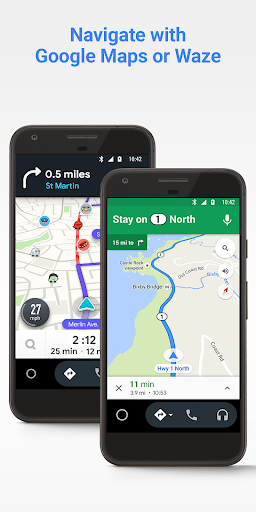
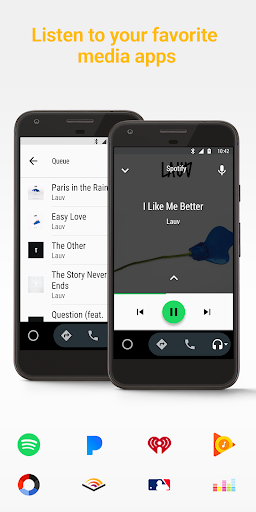
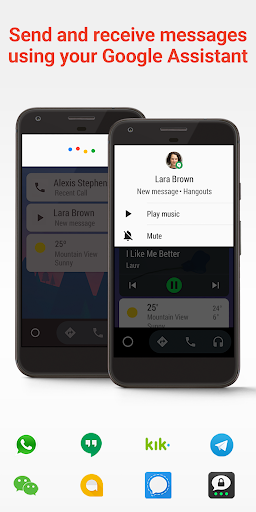

To use Android Auto, you will need a compatible car and an Android phone running Android 5.0 or higher. You can connect your phone to your car using a USB cable or Bluetooth. Once your phone is connected, you will be able to use Android Auto's features on your car's infotainment system.
To turn off Android Auto, you can disconnect your phone from your car's infotainment system. You can also turn off Android Auto in the settings of your phone.
1. Make sure your car is compatible with Android Auto. 2. Make sure your Android phone is running Android 5.0 or higher. 3. Connect your phone to your car's infotainment system using a USB cable or Bluetooth. 4. Once your phone is connected, you will be able to use Android Auto's features on your car's infotainment system.
Welcome to Pixelvoy - your go-to destination for downloading the latest and most popular Android apps. Our mission is to provide a safe, reliable, and user-friendly platform for Android users to discover and download the best apps.
At Pixelvoy, our top priority is to deliver top-notch content that is relevant to our users. Our team of experts carefully selects and reviews each app before it is available for download on our platform. We also regularly update our app library to ensure our users can access the latest versions of their favorite apps.
At Pixelvoy, we provide a wide range of high-quality apps that cater to all your needs. Our platform is continuously updated with the latest and hot apps, ensuring users can access the most up-to-date apps.
We prioritize providing a seamless and hassle-free app download experience. Our website is easy to navigate, and our download process is quick and secure.
Thank you for choosing Pixelvoy as your trusted source for Android apps. We hope you enjoy using our platform and welcome your feedback and suggestions.


