
ADVERTISEMENT
The Microsoft Authenticator app, available for download on both Android and iOS platforms, offers robust security for your online accounts. Its key features include:
1. Multi-Factor Authentication: Enhance your account security with a second verification step after entering your password. The Authenticator provides either a notification for approval or generates a one-time password (OTP) that changes every 30 seconds.
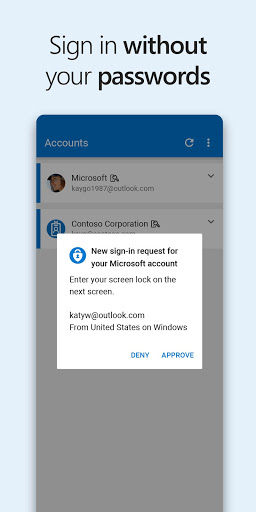
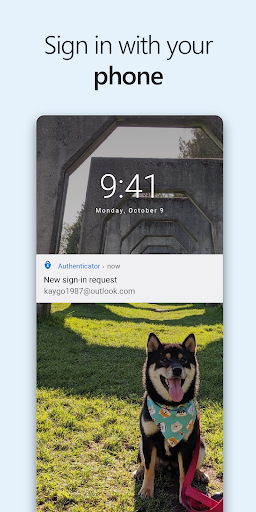
2. Passwordless Sign-In: Experience the convenience of logging into your Microsoft account without a password. Simply respond to a notification sent to your device using your fingerprint, face ID, or PIN.
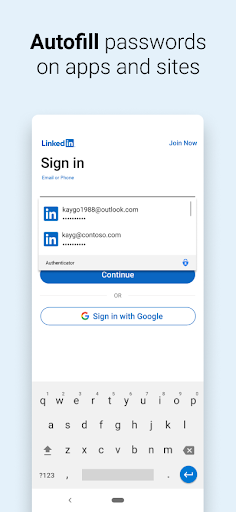
3. Autofill Passwords: The app stores and auto-fills your passwords across various websites and apps, syncing seamlessly with your Microsoft Edge passwords.
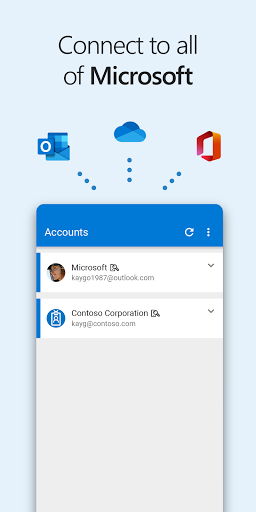
4. Account Management: Manage and access personal, work, or school Microsoft accounts with greater ease and high security.
5. Broad Compatibility: Add multiple non-Microsoft accounts such as Facebook, Amazon, Dropbox, Google, and more, for secure login Microsoft Authenticator procedures.
1. Enhanced Security: With the free Microsoft Authenticator app, you get the confidence of an additional layer of security through multi-factor authentication.
2. Passwordless Access: The convenience of the passwordless feature ensures quick access to your Microsoft products and services without compromising security.
3. Ease of Use: The Microsoft Authenticator apk offers a user-friendly interface and simplifies the login process, promoting a hassle-free user experience.
1. Initial Setup: Installation and configuration might be complex for some users. Installing Microsoft Authenticator requires some tech know-how.
2. Dependence on Device: If your smartphone is lost or not accessible, logging in can become complicated.
3. Limited Recovery Options: For accounts secured by Microsoft Authenticator, forgetting your backup recovery methods could lock you out.
1. Backup Your Accounts: Always keep a backup of your accounts and recovery codes in case you need to install Microsoft Authenticator on a new device.
2. Keep the App Updated: Regularly check for updates to ensure you have the latest security features and improvements.
3. Secure Your Device: Since authentication links to your device, make sure your phone is protected with a strong PIN, fingerprint, or facial recognition for maximum security.
4. Understand Compatibility: Before you download Microsoft Authenticator, verify that it is compatible with the services and accounts you use most often.
Q: Is the Microsoft Authenticator app free?
A: Yes, the Authenticator app is free to download and use.
Q: Can I use Microsoft Authenticator on multiple devices?
A: Yes, you can set up the Authenticator app on multiple devices, but you'll need to perform the setup process individually for each device.
Q: Does Microsoft Authenticator work if I'm offline?
A: Yes, the app can generate one-time passwords (OTP) without an internet connection.
Q: Can I use Microsoft Authenticator for non-Microsoft accounts?
A: Yes, the app allows you to add and manage various non-Microsoft accounts for two-factor authentication.
Secure your digital life by installing the Microsoft Authenticator app today for Android and iOS, ensuring safe and convenient access to all your online activities.
ADVERTISEMENT

Welcome to Pixelvoy - your go-to destination for downloading the latest and most popular Android apps. Our mission is to provide a safe, reliable, and user-friendly platform for Android users to discover and download the best apps.
At Pixelvoy, our top priority is to deliver top-notch content that is relevant to our users. Our team of experts carefully selects and reviews each app before it is available for download on our platform. We also regularly update our app library to ensure our users can access the latest versions of their favorite apps.
At Pixelvoy, we provide a wide range of high-quality apps that cater to all your needs. Our platform is continuously updated with the latest and hot apps, ensuring users can access the most up-to-date apps.
We prioritize providing a seamless and hassle-free app download experience. Our website is easy to navigate, and our download process is quick and secure.
Thank you for choosing Pixelvoy as your trusted source for Android apps. We hope you enjoy using our platform and welcome your feedback and suggestions.


